You could have:
- amazing products,
- great prices,
- beautiful photography,
- and a professionally designed online store…
…but if your logo looks blurry, stretched, or trapped inside a mysterious white rectangle from 2009, customers notice immediately.
It’s harsh, but true.
Your logo is one of the first trust signals people see when they visit your online store. In many cases, customers judge your business before they’ve even looked at your products.
At AbuCart, we’ve noticed something interesting: some stores instantly feel more professional than others, even before products are loaded. And most of the time, the difference comes down to branding and logo quality.
The good news? You don’t need a fancy design agency or a R50,000 branding package to fix this. Small improvements can make a massive difference.
Let’s talk about some of the most common logo mistakes online store owners make, and how to avoid them.
First Impressions Matter More Than You Think
Online shoppers are skeptical. Especially in South Africa where scam stores and fly-by-night Facebook pages have unfortunately made people cautious.
When someone lands on your website, they subconsciously ask:
- Is this business legitimate?
- Can I trust this store?
- Will I actually receive my order?
- Does this feel professional?
And your logo plays a surprisingly big role in answering those questions.
A clean, modern logo instantly makes a store feel:
- more trustworthy,
- more established,
- and more valuable.
A blurry logo, on the other hand, can make even good products feel cheap.
It’s a bit like showing up to a business meeting in flip-flops. Technically you still arrived… but people are judging you already.
JPEG vs PNG — Why Your Logo File Format Matters
One of the biggest issues we see is store owners uploading logos in the wrong format.
Let’s simplify this quickly.
JPEG (.jpg)
JPEG files are great for:
- photographs,
- banners,
- lifestyle images,
- and product photos.
But JPEGs are usually terrible for logos.
Why?
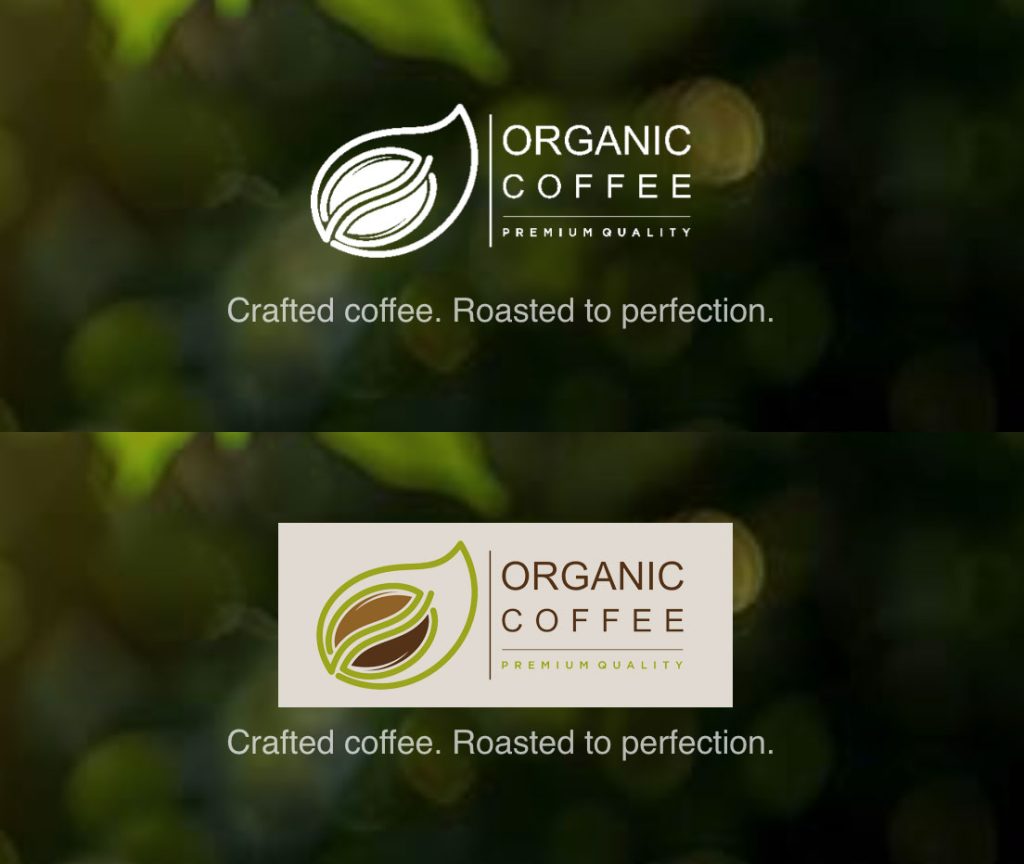
Because JPEG images do NOT support transparent backgrounds.
That’s why many logos appear inside white boxes on websites.
You’ve probably seen this before:
- dark website header,
- beautiful design,
- and then BAM…
- white rectangle around the logo like it’s a passport photo glued onto the page.
Not ideal.
PNG (.png)
PNG files support transparency.
This means your logo can blend naturally into:
- dark headers,
- colored backgrounds,
- hero sections,
- mobile menus,
- and banners.
For ecommerce websites, PNG is the best logo format.
If your logo currently has a white background, converting it to a transparent PNG can instantly improve the look of your store.
Why Transparent Backgrounds Matter
Transparent logos make your branding feel integrated into your website instead of pasted on top of it.
Without transparency:
- your header looks cluttered,
- mobile layouts look messy,
- and your branding feels less polished.
Transparent logos create a cleaner and more modern ecommerce experience.
And honestly? Modern customers notice these things, even if they don’t consciously realize it.
Common Logo Mistakes We See
Let’s have a little honest conversation here 😅
These are some of the most common logo issues we see from first-time online store owners:
Uploading a Screenshot as a Logo
This happens a LOT.
Someone takes:
- a screenshot from Facebook,
- a WhatsApp profile image,
- or a photo of a business card…
…and uploads that as their logo.
The result is usually:
- blurry quality,
- wrong dimensions,
- poor scaling,
- and compression artifacts.
Your logo should ideally be exported properly from the original design file.
Tiny Text Nobody Can Read
Remember:
Most customers are browsing from mobile phones.
If your logo has:
- 14 words,
- a slogan,
- a phone number,
- a motivational quote,
- and a detailed illustration of a lion climbing Table Mountain…
…it’s probably too much.
Simple logos usually perform better online.
Using Only a Square Logo
This is another very common issue.
Most businesses today only have:
- Instagram profile logos,
- square social media graphics,
- or WhatsApp profile images.
But ecommerce websites often need horizontal logos.
Square Logos vs Horizontal Logos
Square logos are not “wrong”, but they are often impractical for websites.
Why?
Because website headers are usually horizontal.
A square logo inside a horizontal header:
- becomes tiny,
- wastes space,
- or forces awkward layouts.
Horizontal Logos Work Better For Websites
A horizontal logo fits naturally into:
- navigation bars,
- desktop headers,
- email templates,
- invoices,
- and ecommerce stores.
For example:
Horizontal Layout

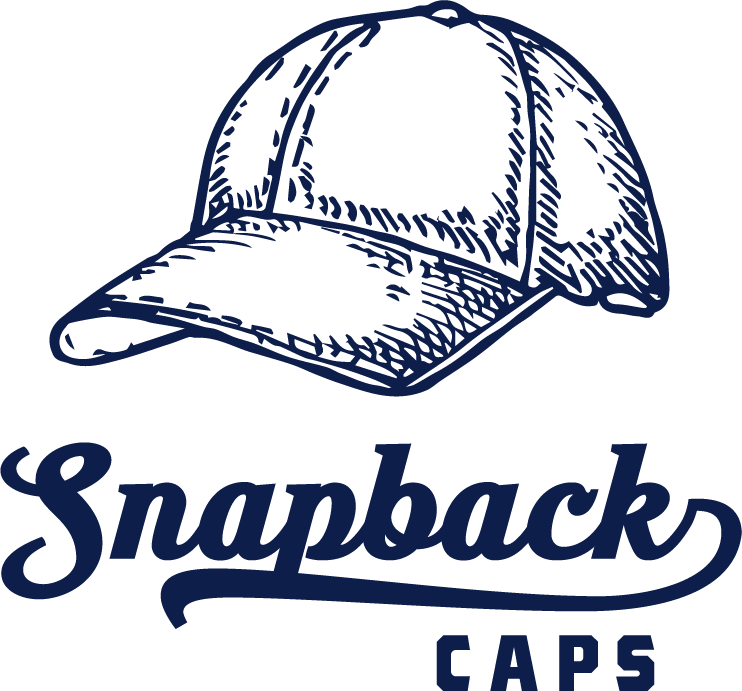
Vertical or Stacked Logos Still Have A Purpose
Stacked logos are useful for:
- social media profiles,
- packaging,
- stickers,
- profile icons,
- and mobile branding.
Example:
The best brands usually have multiple versions of their logo.
What Does “Vectorized” Mean?
You may have heard designers talk about vector logos before.
It sounds complicated, but it’s actually very simple.
A vector logo is created using shapes and mathematical lines instead of pixels.
This means it can scale infinitely without becoming blurry.
Why Vector Logos Are Important
If your logo is vectorized:
- it stays sharp at any size,
- it prints properly,
- it works for signage,
- it scales perfectly for websites,
- and designers can edit it easily later.
Vector files are usually:
- SVG
- AI
- EPS
- or PDF vector files.
SVG files works great on websites but not well in emails. Most email clients won’t discplay SVG files. But SVG files can easily be converted into crisp and clean PNG files which are perfect for websites and email logos.
When Should You Vectorize Your Logo?
If your business is growing and you’re serious about branding long-term, it’s worth doing.
Especially if you plan to:
- print banners,
- create signage,
- brand packaging,
- wrap vehicles,
- or invest in marketing.
A vector logo is basically future-proofing your brand. You will have a logo format that can easily be manipulated and exported to any other format that is crisp and clear.
Your Logo Should Work Everywhere
A good logo should work:
- on desktop,
- on mobile,
- on social media,
- on invoices,
- on packaging,
- and inside your online store.
If your logo only looks good in one specific place, it may need refinement.
This is why simplicity matters so much.
Some of the world’s biggest brands have very simple logos:
- Nike,
- Apple,
- Adidas,
- McDonald’s.
Simple is memorable.

Simple scales better.

Simple works on mobile.
You Don’t Need To Spend A Fortune
This part is important.
Many small business owners delay improving their branding because they think:
“I can’t afford a professional logo.”
But today there are many affordable options:
- Canva,
- AI logo tools,
- Fiverr freelancers,
- ChatGPT image generation,
- local designers,
Even a few small improvements can dramatically improve how professional your online store feels.
Your AbuCart Logo Toolkit
The 6 Logo Variations Every Store Should Have
A great logo doesn’t just look good once.
It needs to work across light backgrounds, dark banners, mobile headers, hero sections, and tiny icon spaces.
When setting up your AbuCart store, we highly recommend preparing multiple logo variations so your branding always looks polished — no matter which template or hero style you choose.
Think of it as your brand toolkit.
1. Stacked Logo for Dark Backgrounds

Use this version when your logo appears on:
- Dark hero images
- Dark banners
- Dark footers
- Promotional graphics
Best Practice
- Use white or light text
- Keep strong contrast
- Avoid thin grey lettering
Common Mistake
Uploading a black logo onto a dark hero image.
(Result: invisible logo. The digital equivalent of camouflage.)
2. Stacked Logo for Light Backgrounds
This is your standard full logo for:
- White backgrounds
- Product pages
- Invoices
- Email headers
Best Practice
- Use your primary brand colours
- Ensure readability at smaller sizes
- Keep spacing clean
3. Horizontal Logo for Dark Backgrounds

Horizontal logos are ideal for:
- Navigation bars
- Mobile headers
- Tight spaces
The dark-background version ensures your logo stays readable over dark overlays or photography.
Why It Matters
A stacked logo may become too tall for mobile navigation areas.
4. Horizontal Logo for Light Backgrounds

This is often your most-used version across:
- Header navigation
- Checkout pages
- Store admin areas
- Email footers
Best Practice
- Keep it compact
- Avoid excessive taglines
- Ensure it still looks good on mobile
5. Icon Logo for Light Backgrounds
This is your simplified brand mark.
Perfect for:
- Favicons
- Mobile app icons
- Social profile images
- Small UI elements
Best Practice
Use:
- A symbol
- Initials
- A simplified mark from your main logo
6. Icon Logo for Dark Backgrounds
Same concept — but optimized for dark surfaces.
Useful for:
- Dark mode templates
- Dark hero sections
- Social media graphics
- Promotional banners
Recommended File Types
SVG (Best Option)
Perfect for:
- Sharp scaling
- Retina displays
- Modern websites
PNG
Good fallback option with transparent backgrounds and used for sending emails.
Avoid
- JPG logos with white boxes behind them
- Tiny low-resolution screenshots
- Logos copied from WhatsApp profile pictures
(Yes… we see this surprisingly often.)
Recommended Sizes
| Logo Type | Recommended Width |
|---|---|
| Stacked Logo | 1200px |
| Horizontal Logo | 1600px |
| Icon Logo | 512x512px |
Pro Tip
Before uploading your logo to AbuCart, test it on:
- White background
- Black background
- A busy photo
- Mobile screen size
If it disappears, becomes unreadable, or feels cramped, you probably need another variation.
Branding Builds Confidence
Here’s something interesting we’ve noticed at AbuCart:
The moment store owners start improving their branding:
- they upload more products,
- customize their banners,
- tweak their layouts,
- connect custom domains,
- and become more emotionally invested in their stores.
Because suddenly…
it starts feeling like a real business.
And that mindset shift is incredibly important.
Final Thoughts
Your logo is not just decoration.
It’s one of the first trust signals customers see when visiting your online store.
A clean, professional logo helps:
- build trust,
- improve credibility,
- make your products feel more valuable,
- and create a better shopping experience overall.
The good news is that improving your logo is often much easier than people think.
Sometimes the difference between:
“This looks amateur”
and
“This feels like a real brand”
…is simply a better logo file.